
Original Question or Issue:
How to create a DLP rule from the Admin Portal to restrict users when using FileCloud Desktop.?
The available documentation and the Rule Create Help in the Admin Portal >> Smart DLP >> Update/Create Rule page does not list a _request.agent parameters when using FileCloud Desktop for Windows and Mac.
Environment:
- Product - FileCloud Server
- Version - Any
- Platform - Windows, Linux
Steps to Reproduce:
-
Log in to the Admin Portal.
- Navigate to Smart DLP from the left pane.
- Click on Add a DLP Rule button.
- Click on Rule Expression Builder.
- Click on the Add button, then click on New Rule.
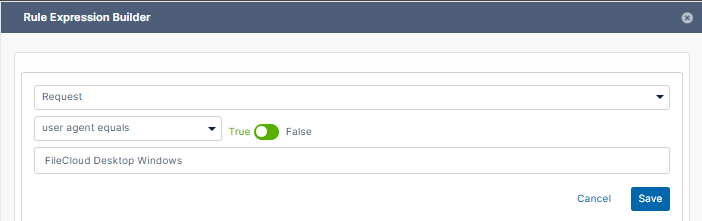
- Set the criteria drop-down list to user agent equals.
The value set here can be referenced from our Support Documentation or the Rule Creation Help. However it does not include a value for FileCloud Desktop.
Error or Log Message:
Defect or Enhancement Number:
FCL-6604
Cause:
Resolution or Workaround:
When creating a DLP rule that intends to use FileCloud Desktop, the values below can be used for the _request.agent parameter in the Rule Creation Builder.
-
FileCloud Desktop Windows
-
FileCloud Desktop Mac
Notes: