
Original Question or Issue:
Why am I getting a "Database Schema Update Failed" after upgrading FileCloud Server to the latest version? Server is running in Ubuntu 22.04
Environment:
- Product - FileCloud Server
- Version - 23.261.x
- Platform - Windows, Linux
Steps to Reproduce:
NA
Error or Log Message:
The System Check shows the error below.
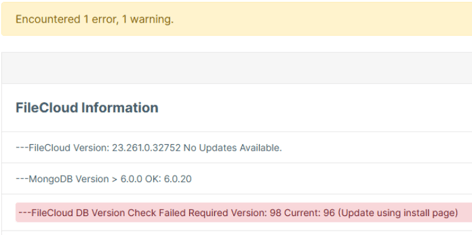
Server logs repeatedly show the error lines below
Defect or Enhancement Number:
Cause:
- This could happen if MongoDB did not update successfully, or the correct scripts to upgrade the FileCloud Server in a Linux environment were not used.
Resolution or Workaround:
The steps below is specific to FileCloud Server hosted in Ubuntu.
-
Make sure to secure a backup of your DB or your entire system in case of the event that we need to rollback.
-
Plan your downtime so no user and productivity is affected.
-
Through the command line, build the repo using the commands below:
apt clean cache
curl -sL https://repo.filecloudlabs.com/static/fcp/apache_check | sudo bash -
curl -fsSL https://pgp.mongodb.com/server-7.0.asc |
sudo gpg -o /usr/share/keyrings/mongodb-server-7.0.gpg --dearmor
echo "deb [ arch=amd64,arm64 signed-by=/usr/share/keyrings/mongodb-server-7.0.gpg ] https://repo.mongodb.org/apt/ubuntu jammy/mongodb-org/7.0 multiverse" | sudo tee /etc/apt/sources.list.d/mongodb-org-7.0.list
rm -rf /etc/apt/sources.list.d/mongodb-org-6.0.list
apt update -y
apt install -y mongodb-org=7.0.30 mongodb-org-database=7.0.30 mongodb-org-server=7.0.30 mongodb-org-mongos=7.0.30 mongodb-org-tools=7.0.30 --allow-downgrades
apt-mark hold mongodb-org mongodb-org-database mongodb-org-server mongodb-org-mongos mongodb-org-tools
-
Once completed, run mongosh
-
Check the FCV version db.adminCommand({getParameter: 1, featureCompatibilityVersion: 1}), if this still shows 6.0, you may set the FCV using the command db.adminCommand({ setFeatureCompatibilityVersion: "7.0" }).
Notes: